# Correo interno

Permite enviar correos entre usuarios del sistema

# ¿Cómo enviar correos entre los usuarios del sistema?

<span style="font-weight: 400;">Aquí le mostramos como hacerlo: </span>

<span style="font-weight: 400;"><iframe allowfullscreen="allowfullscreen" height="314" src="https://www.youtube.com/embed/MxL8hlqh8ME?ab_channel=InterServicioss" width="560"></iframe>

</span>

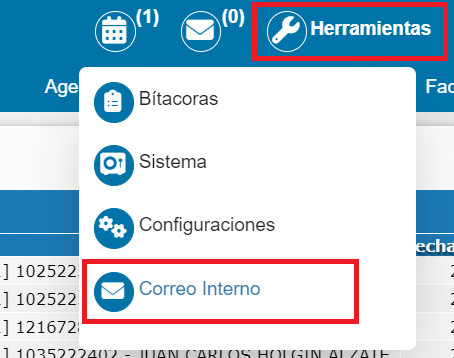
<span style="font-weight: 400;">**Paso 1:** </span><span style="font-weight: 400;">Se debe ingresar al módulo de **Herramientas &gt; Correo Interno**.</span>

<span style="font-weight: 400;">![](https://docs.nuby.ai/uploads/images/gallery/2024-07/lzGcMMOh6ULcuHyd-embedded-image-tuuirpt5.png) </span>

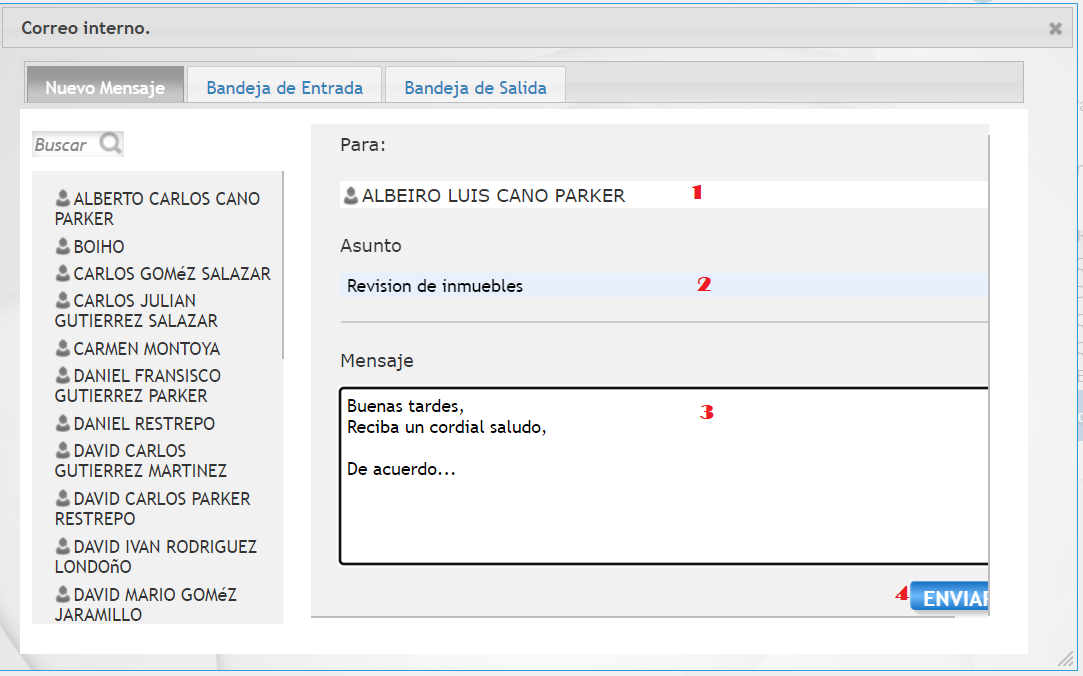
<span style="font-weight: 400;">**Paso 2:** Luego aparecerá una vent</span>ana emergente que le permite enviar y recibir correos entre los usuarios del sistema.

Para enviar un correo, por favor arrastre el usuario al que le va a enviar el mensaje, diligencie el asunto, el mensaje y de clic en el botón **Enviar**.
![](https://docs.nuby.ai/uploads/images/gallery/2024-07/PCz6qTVnRgURyFeK-embedded-image-aelz4lmh.png)

# ¿Cómo revisar el correo interno?

<span style="font-weight: 400;">En este videotutorial le mostramos como hacerlo: </span>

<span style="font-weight: 400;"><iframe allowfullscreen="allowfullscreen" height="314" src="https://www.youtube.com/embed/rxZhOHo_9mQ?ab_channel=InterServicioss" width="560"></iframe>

</span>

<span style="font-weight: 400;">**Paso 1:** Se debe ingresar al módulo de **Herramientas &gt; Correo Interno.** </span>

<span style="font-weight: 400;">![](https://docs.nuby.ai/uploads/images/gallery/2024-07/tvK0AJADu3BwnYAY-embedded-image-zwi06nz0.png)</span>

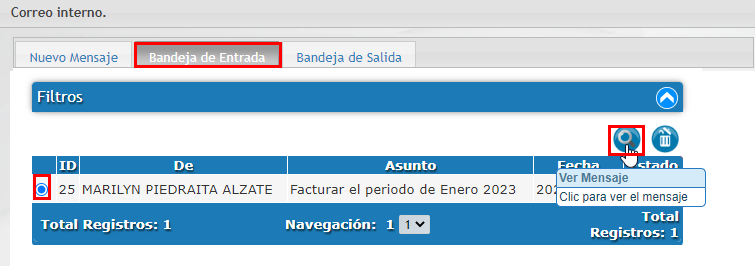
<span style="font-weight: 400;">**Paso 2:** Luego aparecerá una ventana emergente, donde podrá revisar los correos recibidos. </span><span style="font-weight: 400;">Para revisar el correo, por favor ingresar a las pestañas ubicadas en la parte superior **Bandeja de entrada** y **Bandeja de salida** seleccione el correo y de clic en el icono **ver mensaje** para visualizarlo.</span>

![](https://docs.nuby.ai/uploads/images/gallery/2024-07/8T9Csc6SH4UH2GxS-embedded-image-fck7q3fc.png)