# Perfil
Este libro ofrece una guía detallada sobre cómo configurar tu perfil en el sistema. Incluye instrucciones paso a paso para personalizar y ajustar las opciones de tu perfil según tus preferencias y necesidades. Con explicaciones claras y prácticas, te ayudará a optimizar tu configuración para mejorar tu experiencia y eficiencia en el uso del sistema.
# ¿Cómo editar mi perfil / Cambiar contraseña?
En esta opción podrá cambiar color de usuario, contraseña y configurar la notificación de alertas y la periodicidad de los recordatorios de la agenda.Se debe ingresar desde el botón ubicado en la esquina superior derecha de Perfil > Perfil.**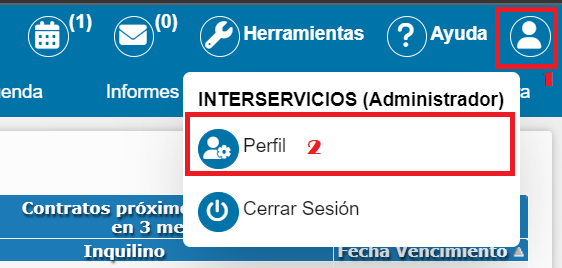** Luego aparecerá una ventana con los datos básicos del usuario donde podrá modificar la información que necesite, como nombre de usuario, correo electrónico, municipio, teléfono, color preferido, contraseña y agregar una foto.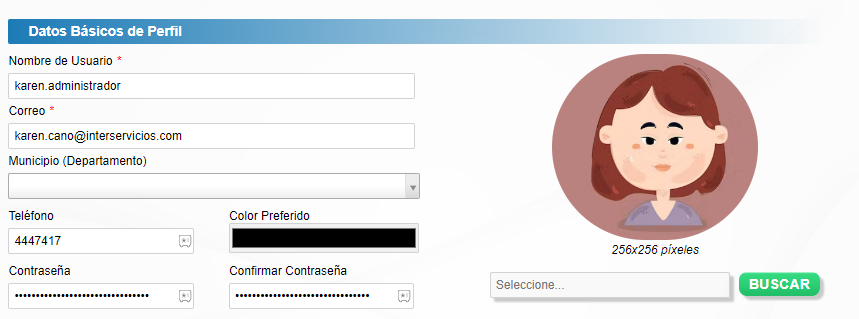Adicionalmente, podrá administrar las notificaciones de usuario y notificaciones de calendario. Una vez hecho los ajustes dar clic en el botón Guardar cambios. 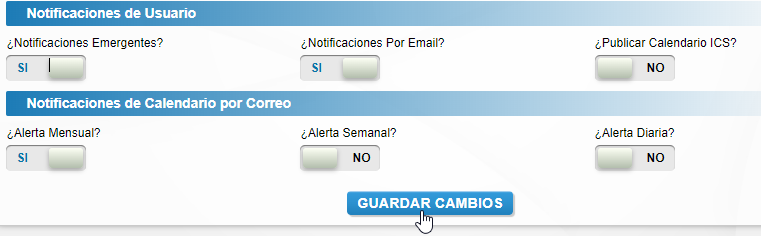
**¿Cómo cambiar mi contraseña?**
****